There are several things that can cause interference or noise on your phone. If you think the problem is with your BT line or service, you can test your line and do some quick checks with our landline troubleshooter.
Please try these steps in order:
- If you've got a broadband line, check whether you need to use a microfilter to stop the broadband interfering with your phone service. Find out more at Why do I need ADSL filters (microfilters) and where do they go?
- If your phone's plugged into a phone extension, try it in the primary socket instead. This is usually the one nearest your front door
If it sounds ok now, this shows that the phone works, but there may be a problem with your extension wiring. To find out more about phone sockets, see What type of phone socket have I got?
- Try plugging another phone that you know works into the phone socket. If you've still got the problem, contact your service provider to get the line checked
- Try testing your phone on a phone line in a different property, such as a neighbour's line. This is to see if the problem is with your phone
- Watch our video to see if the problem is caused by how your wiring is set up at home:
Extra checks for a cordless phone:
- Check that the base is away from other electrical or electronic equipment. For example, away from TVs, computers, microwaves, mobile phones, modems or routers. Ideally, the base should be at least one metre away to avoid possible interference.
- Check the base is away from large metal items such as fridges, freezers and microwave ovens.
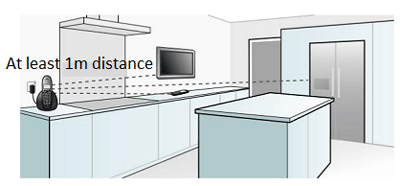
- Make sure there are as few walls as possible between the base and handset.
- If you wear a hearing aid, check that the phone's radio signals are not interfering with it and causing a humming noise.
If you are still having problems, please contact the helpdesk for your phone model. You can find the contact details in the user guide for your phone.