Here's how to fix any problems you may be having with BT Parental Controls.
Select from the links below to find the help you need:
Blocking problems
How will I know if I've been blocked by BT Parental Controls?
Site blocked incorrectly by BT Parental Controls
Parental Controls are on, but search engine results and images are inappropriate
BT Parental Controls isn't blocking inappropriate YouTube videos
BT Parental Controls won't let me override a blocked site?
BT Parental Controls is on, but not blocking websites/inappropriate content?
I can't view a website, but there is no blocked page
My BT ID details are saved on the blocked page. How do I stop this?
A URL is in my blocked and allowed list, which takes priority?
If gaming is blocked, will this block access to all gaming applications on my devices?
If I block gaming, will this block access to online multiplayer game servers?
Will BT Parental Controls block HTTPS websites?
If social networking is blocked, will this stop access to all social networking?
Access problems
I can't access the App store on my device?
I can access a site on my BT Parental Controls blocked list?
I can't access the online multiplayer servers for my games console?
Set up problems
I've set up my BT Parental Controls but it's not blocking content?
After two hours, my BT Parental Controls are still not active?
My BT Parental Controls should be switched on but I've got an email saying they've been turned off?
My app is not working but I have not received a blocked page. Is this BT Parental Controls?
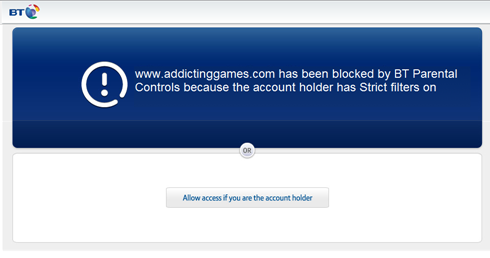
How will I know if I've been blocked by BT Parental Controls?
If the website you're trying to access is blocked by BT Parental Controls, you'll see this blocked page in your browser. If you'd still like to access this site and you're the account holder, you can override this page by selecting the 'Allow access if you are the account holder' button and entering your BT ID.
If you're trying to access a secure site (starting with https) that's blocked by BT Parental Controls, you'll see a white screen instead of the blocked page. To view the site, you'll need to add it to your allowed list.
How can I personalise my settings?
First check your filter level by logging into My BT, scrolling down to the 'BT Parental Controls' panel and selecting 'Personalise your settings'. You can choose between light, moderate, or strict, or use the custom option to personalise your filter level based on the category of sites you want to block.
As well as filter levels, you can also add individual sites to an allowed list by selecting the ‘Add allowed or blocked sites’ tab. If you want to allow certain websites even though the filter level you selected blocks the category you should add it to your allowed list. This will ensure that you can always access this site.
It's best to add the site to your allowed list without the 'www.' prefix, which will allow all domains of the site you're trying to allow. If the site is still blocked, add it again with the ‘www’ prefix.
Remember, your settings can take up to 10 minutes to take effect. You'll receive an email from us to confirm the changes.
A site is being blocked incorrectly by BT Parental Controls. How can I report this?
Sites are blocked by BT Parental Controls based on their primary purpose and categorisation.
See the different site categories BT Parental Controls can block >
If you don't think a site should be blocked, you can let us know by emailing categorisation@bt.com.
We need to know:
- The URL (website address) of the site you believe is being incorrectly blocked.
- The URL (website address) of the page you're sent to, which informs you that the site you're trying to visit is blocked.
- Your BT account number.
- Your current IP address. You can find this out by going to www.whatsmyip.org.
If you are the account holder, you can also add sites to your 'allowed sites' list, which will stop BT Parental Controls from blocking them. Click here for instructions on how to do this.
I have BT Parental Controls turned on, but search engine results and images are inappropriate - why aren't these blocked?
BT Parental Controls doesn't inspect content returned from a site, it looks at the URL and the category it has been assigned to. Sites such as Google are defined as 'Search Engines' and are not blocked by BT Parental Controls. As part of the Parental Controls service, we have automatically enabled Google and Bing SafeSearch. However, other search engines may not have this feature to turn on by users.There are options to help with this:
- Create a personalised filter level and block the 'Search Engines' category. You could then add one particular search engine to your allowed list
- Turn on child safety features that may exist in your devices and for apps like YouTube, use apps that are designed specifically for kids like YouTube for Kids
BT Parental Controls isn't blocking YouTube videos that could be deemed inappropriate
BT Parental Controls works by categorising a site's URL. So it would assess www.youtube.com but not the specific video.
You can block YouTube by blocking the 'Media and Streaming' category. If you don't want to block the whole category, you can block YouTube by adding the URL to your blocked list.
Blocking a website
If you don't want to block YouTube but would like to make sure your children don't come across inappropriate content, we recommend using YouTube for Kids.
I am trying to override a blocked site, but BT Parental Controls won't let me.
If you're trying to override a site from the blocked page and this isn't working, you should add the site to your allowed list within the BT Parental Controls management pages.
Adding sites to your allowed list
BT Parental Controls is active, but it's not blocking websites/inappropriate content?
BT Parental Controls works by categorising a site's URL. And relies on using BT DNS (Domain Name Service).
If you think a website isn’t categorised correctly, please email us at categorisation@bt.com and include:
- The URL (website address) of the site you believe should be blocked.
- Your BT account number.
- Your current IP address. You can find this out by going to www.whatsmyip.org.
You should also check you’re not using non-BT DNS.
How to check your DNS settings.
Some third-party 'Internet of Things' devices like smart TVs and apps may use their own DNS. Therefore, BT Parental Controls do not work on these devices, and inappropriate websites will not be blocked. Instead, you’ll need to set your own controls on the device to make sure inappropriate websites are blocked.
Alternatively, you might be having problems because the website you're trying to view is cached. You should clear your browser's cache and try again.
If this doesn't work, you should reboot your Hub.
If your filters are still not working, then please contact us.
I can't view a website, but there is no blocked page
Some sites use a secure connection (HTTPS at the start of the URL), which prevents us from displaying the blocked page screen that would normally appear. You can navigate away from this page by typing a new URL into the bar at the top of the page. If you want to access this site, then you can add it to your allowed list.
Which URL in my blocked and allowed lists takes priority?
BT Parental Controls prioritises the sites on your 'allowed' list. So if you have the URL on both your blocked and allowed lists, the site will NOT be blocked. To make sure you get the best experience with your BT Parental Controls, we recommend having a URL on only one list at a time.
Blocking and allowing websites with BT Parental Controls.
If I have gaming blocked, will this block access to all gaming applications on my smartphone or tablet device?
BT Parental Controls will block access to internet-connected gaming applications when the gaming category is blocked. It will be blocked if the application requires internet access and the URL the App uses is on the gaming category list. This means that some applications may be blocked and others will still be able to be played.
Some applications are also available to play offline and don't need an internet connection.
You should also check that the 3G/4G connection (if applicable on these devices) is turned off, as the application could access the internet via 3G/4G and thus bypass the filters set up on your internet connection.
Will BT Parental Controls block websites starting with https?
Yes, BT Parental Controls will block HTTPS sites if the category the site falls under, or the site itself, is blocked. In this case, you won't see a BT blocked error message page, but a browser message saying it cannot connect to the webpage. For example, if social networking is blocked, then any secure link (https) associated with a social networking site will return a browser error page.
You don't need to block an HTTPS version of a site if you've already blocked the main site.
If I block social networking on BT Parental Controls, will this stop access to social networking?
BT Parental Controls will block access to social networking sites on web browsers when social networking is blocked. However, because apps on mobile devices don’t run in web browsers, they won't be blocked.
If I block gaming, will this block access to online multiplayer game servers?
Yes, if you have gaming blocked in BT Parental Controls, it will block access to online gaming servers.
My BT ID details are saved on the blocked page. How do I stop this from happening?
This is most likely to be because you have asked your browser to remember your username and password in the past. If you're presented with this question, please ensure that you opt for 'Never for this site' and don't click 'Remember me'.
If you've already asked for it to be saved, use the help below to clear the username and password from your browser.
Internet Explorer
- Select Tools or the cog icon in the top right of Internet Explorer.
- Select Internet Options.
- Under the 'Browsing history' section, select Delete.
- Choose Passwords and select Delete.
Google Chrome
- Select
 in the top right of Google Chrome.
 - Select Settings.
- Select Show advanced settings... at the bottom of the page.
- Under 'Privacy', select Clear browsing history.
- Select the range of passwords you would like to clear, tick the 'Clear saved passwords' box and select Clear browsing data.
Mozilla Firefox
- Select Firefox in the top left of Mozilla Firefox.
- Select Options from the dropdown.
- Select the Security tab, then Saved passwords.
- You can then delete individual saved usernames and passwords, or all of your passwords, using the 'Remove' and 'Remove all' buttons.
Safari
- Select Safari in the top left, then Preferences.
- Select the Passwords tab.
- Highlight the password details you want to delete and click Remove.
I can't access my work VPN when using BT Parental Controls
Unfortunately, BT Parental Controls will not work over a VPN connection, as we're unable to support this function.
I can't access the App Store on my device. Is BT Parental Controls blocking it?
BT Parental Controls will block access to an app store under the 'Strict' setting when media streaming is blocked. If you want to access this, you can either unblock the category or, if you know the app store URL, add it to the allowed list.
I'm still getting access to a site that's on my BT Parental Controls blocked list
If the site has been successfully added to your blocked list and you can view it, first check whether it's on your allowed list. If it's in your allowed list, just click the X next to the address to remove it.
Remember, your settings can take up to 10 minutes to take effect. If 10 minutes have passed, you should check the URL entered in the blocked list and ensure it's an exact match. So if you've typed 'www.facebook.com' into your blocked list and then typed 'facebook.com' to access the site, then this is not an exact match. To ensure the site is blocked, you should add both URLs to your blocked list. If you add the site to your blocked list without 'www.' prefix, then this will block all domains of the site you're trying to block.
If the site is still not blocked, then please contact us.
I can't access the online multiplayer gaming servers on my games console. Has this been blocked by BT Parental Controls?
If you have gaming blocked in BT Parental Controls, then this will block access to online multiplayer gaming servers. You'll not see a blocked page, but your game will not be able to connect to the server.
If you're the account holder and you want access to the online gaming servers, you can either unblock the gaming category or if you know the URL it uses to access the internet, you can add this to your allowed list >
I've just set up my BT Parental Controls, but it doesn't seem to be blocking content.
Activation of BT Parental Controls takes up to two hours. You can log in to the management page, and a message will appear to let you know whether your filters are live yet.
If this message appears after 2 hours, please reboot your hub.
Two hours have passed, and my BT Parental Controls are still not active
If the two hours since you activated BT Parental Controls have passed and they're still not active, then the first step is to reboot your Hub.
If this still doesn't activate your BT Parental Controls, then contact us.
My BT Parental Controls should be switched on, but I've received an email saying they've been turned off
If you've not turned off BT Parental Controls, someone may have got hold of your BT ID.
You should first reset your password.
Reset your BT ID password.
You can now switch BT Parental Controls back on:
- Log in to My BT with your BT ID.
- Scroll down to the 'My Extras' section and click Personalise your settings in the 'BT Parental Controls' panel.
- Move the slider in the 'BT Parental Controls' section back to On.
While you're there, it might be worth checking that none of your other settings has changed.
My app is not working, but I have not received a blocked page. Is this because of BT Parental Controls?
BT Parental Controls can only deliver a blocked page when you're trying to access a site in a browser. If you're trying to access an application in a category you've blocked and it's not working, it is most likely due to BT Parental Controls.
It may say that the application 'cannot connect to the server', 'cannot connect to the internet', or that 'there is an error'. If you need access to the application, you can unblock the category it is under, or, if you know the application's URL for accessing the internet, you can add it to your allowed list.
Internet Matters
As part of our commitment to Internet safety for children, BT supports the work of Internet Matters, an online support service for parents seeking advice and tips on keeping their kids safe online.