This article explains how BT Voicemail can help you answer any missed calls. It's easy to use and, most importantly, we give you unlimited access as part of your plan.
You’ll hear a different dial tone whenever you have new messages. Just lift your handset and listen to the dial tone to check.
Do I need to activate Voicemail?
No. BT Mobile automatically diverts all unanswered calls to Voicemail. When a caller leaves you a message, we'll text you to let you know. Voicemails are stored for 30 days.
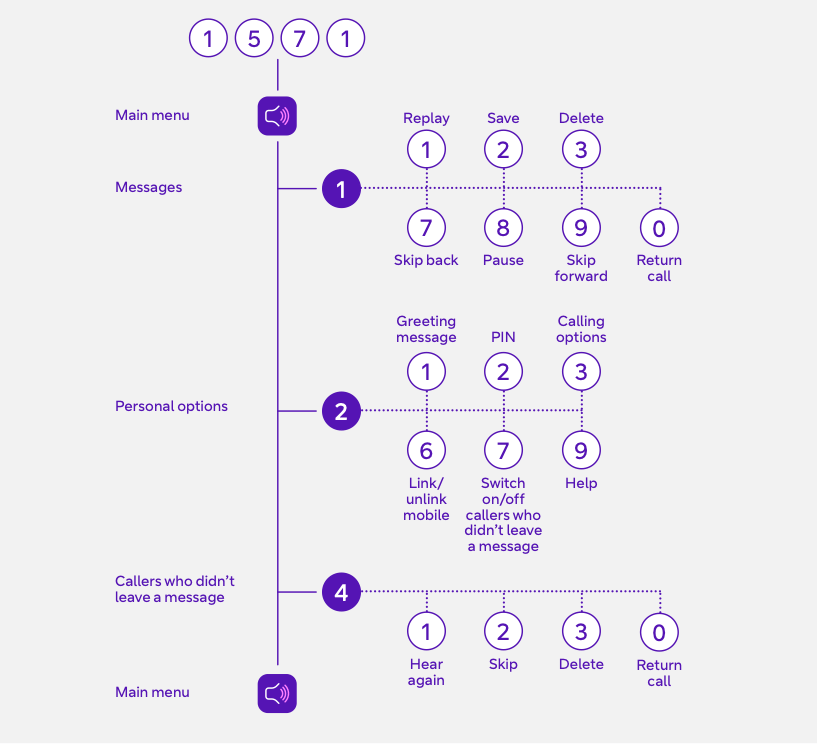
Dial 1571 on your mobile to:
- listen to messages
- set your Voicemail PIN
- personalise your greeting
Set up a Voicemail PIN
By setting up a Voicemail PIN, you can also listen to your messages from any other phone, including a landline. And you can call your voicemail from abroad.
- Dial 1571 from your BT Mobile phone.
- At the personal options prompt, press 2.
- Enter a four-digit PIN (avoid easy-to-guess PINs like 1234 or 1111).
Listen to Voicemail
Dial 1571 from your mobile.
To pick up Voicemail from another phone:
- dial your mobile number
- wait for the greeting, then press *
- enter your Voicemail PIN and follow the prompts
If you want to access your messages from abroad:
- set up a Voicemail PIN before you leave the UK.
- you can't create one while you're outside the country.
What if I forget my Voicemail PIN?
- Dial 1571 using your BT mobile.
- At the personal options prompt, press 2.
- Set a new Voicemail PIN.
What if I use the wrong Voicemail PIN?
If you enter the wrong PIN 3 times, you won't be able to use your Voicemail service for 10 minutes.
Turning Voicemail on and off
- to turn Voicemail off: Dial 15710 from your phone (it's a free call). You'll hear a message: "Your request to turn off conditional diverts to your BT Mobile Voicemail has been confirmed."
- to turn it back on: Dial 15711
For times you don't want to be disturbed, all incoming calls can be diverted straight to Voicemail:
- dial 15712 to turn this on. You'll hear: "Your request to turn on unconditional diverts to your BT Mobile Voicemail has been confirmed."
- dial 15713 to turn it off
Picking up Voicemail messages from abroad
To pick up your Voicemail abroad, you need to have set up a Voicemail PIN before leaving the UK. Make sure international roaming is switched on by going to the Manage what you spend section at www.bt.com/mymobile.
To pick up your Voicemail:
- Dial your own mobile number.
- Wait for your voicemail greeting to kick in.
- Then press *.
- Enter your Voicemail PIN.
- Follow the prompts to listen to your messages.
Need more help?
- Voicemail user guide (PDF doc, 1180KB)