It's always best to connect your BT Hub to the master socket if you can. This is where the broadband signal is strongest, before it goes through any other home wiring which could cause interference. If this isn't possible, then use a new, high quality broadband ADSL extension lead.
Best way to connect your Hub
- Find your primary phone socket (usually near your front door).
- Plug your Hub directly into this socket.
- Use the cables provided with your Hub.
This gives you:
- A stronger connection.
- Better speeds.
- Fewer dropouts.
Avoid using extension leads
Using an extension lead or socket can:
- Reduce your broadband speed.
- Cause connection problems.
- Make your signal less stable.
If you can’t place your Hub near the main socket:
- Use a high-quality extension cable.
- Keep the cable as short as possible.
- Avoid running it near electrical devices.
Better alternatives
Instead of using a long phone extension:
- Use a longer Ethernet cable to connect devices.
- Improve your Wi-Fi setup (for example, reposition your Hub).
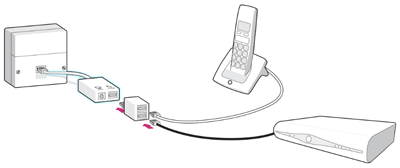
Follow this guidance if your primary socket has one socket, like this:
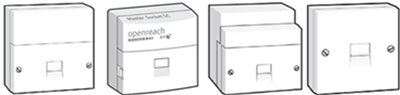
- The microfilter must be the first thing connected to the primary socket, followed by any other equipment.
- To connect more than one device to your phone line, you'll need a splitter. The splitter must connect to the phone part of the microfilter.
- If you're trying to connect an EE TV box, this connects via Ethernet to your BT Hub. Find out more about setting up EE TV.
- Some other TV services need a phone line, in which case the TV box must connect to the phone part of your microfilter. Please refer to your user guide or TV service provider for help.
Simple set-up when your phone and hub can both be near your primary phone socket.
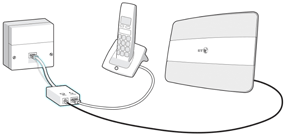
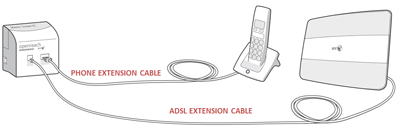
Set up the phone near the primary socket, and place the hub farther away using an ADSL extension cable. Remember - using extension cables can affect your connection.
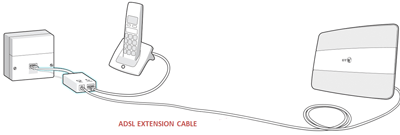
Set up where the phone and the Hub are located far away from the primary socket.
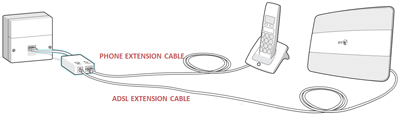
Scenario showing how to connect a third-party set top box that needs a phone connection. The TV box connects to the phone part of the microfilter via a splitter. The phone connects to the other port of the splitter.
Follow this guidance if your primary socket has two sockets, like this:
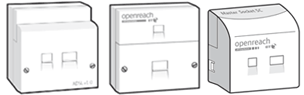
- To connect more than one device to your phone line, you'll need a splitter. The splitter must connect to the phone part of the primary socket
- If you're trying to connect an EE TV box, this connects via Ethernet to your BT Hub. Find out more about setting up EE TV.
- Some other TV services need a phone line, in which case the TV box must connect to the phone part of your primary socket. Please refer to your user guide or TV service provider for help.
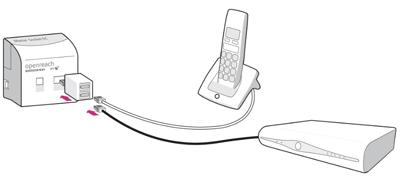
Simple set-up when your phone and Hub can both be near your primary phone socket.
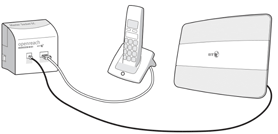
Set up the phone near the primary socket, and place the Hub farther away using an ADSL extension cable. Remember - using extension cables can affect your connection.
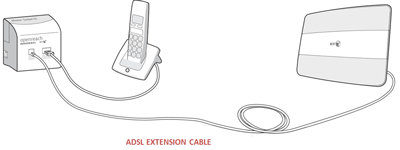
Set up the phone and the Hub far away from the primary socket.
Scenario showing how to connect a third-party set top box that needs a phone connection. The TV box connects to the phone part of the microfilter via a splitter. The phone connects to the other port of the splitter.
For more information on connecting your Hub, go to Connecting and set up your BT Hub.
For more information on internal wiring, go to Home wiring and broadband set-up - a checklist.