Smart Search makes finding something you'll enjoy on BT TV simple. Search for a programme or film you know, or just describe what you fancy watching, and Smart Search will help you find the right thing.
What is Smart Search?
Smart Search is built into BT TV. It lets you search using everyday language, so you don't always need to know the exact title of a programme or film.
You can describe what you want to watch by:
- Mood – like “feel-good”, “edge-of-your-seat” or “chilled”.
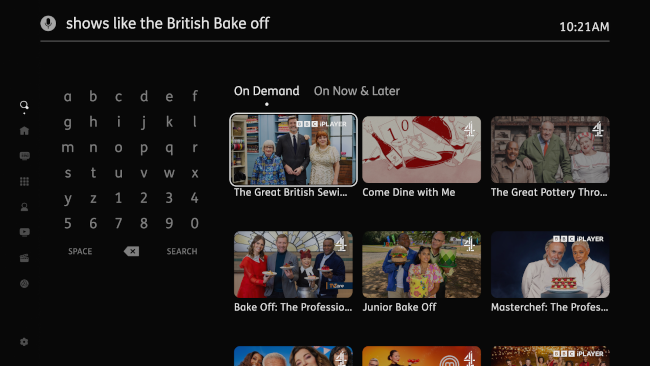
- Theme – such as “space adventures” or “British Bake off ”.
- Plot – for example, “a mystery set in a small town”.
- Quotes or one-liners – useful if you remember something from a programme but can't remember its name.
Smart Search brings together results from live TV, on-demand content and your streaming apps, making it easier to find what you want in one place.
How to use Smart Search
Follow these steps to start searching:
- Press the Search button on your remote to open Search.
- Press and hold the Search button again.
- While holding the button, say what you're looking for. You'll see your words appear on screen as you speak.
- When you've finished, release the button and Smart Search will start searching.
- Smart Search will show matches from across your available services.*
*Availability of content depends on your subscription or plan.
Remember: Make sure your remote is connected
To use Voice Search, your BT TV remote needs to be connected to your TV Box using Bluetooth.
To pair your remote using Bluetooth, press and hold Home and 7 at the same time until the light around the BT icon flashes three times.
Is Smart Search included in my TV package?
Yes. Smart Search is included at no extra cost on TV Box Pro and TV Box Edge. You can start using your voice to search and explore recommendations now.
Can I still type to search?
Yes. You can still type your search just as you do now. Smart Search works with typed searches too, so you can be as general or as specific as you like.
Problems using Voice Search?
If Voice Search isn't working, try these checks.
Check you're using the right remote. If you have more than one BT TV Box, check you're using the remote that's paired with the TV Box you're watching.
Check the Battery level & Bluetooth connection
- Press Home, then go to Settings > Connected devices & Remote
- If the battery level is low, replace the batteries.
- IIf the Connection Status is Disconnected, try pairing the remote via Bluetooth by pressing and holding Home and 7 until the light around the BT icon flashes three times.
Reset and pair your remote again
If Voice Search still isn't working, reset the remote by pressing and holding Home and 9 until the light around the BT icon flashes three times.
Then pair the remote again by pressing and holding Home and 7 until the light around the BT icon flashes three times.