Home Phone Standard
To help fix a problem with your Home Phone Standard service, please call us.
Digital Voice service
If your call quality is poor or your calls keep dropping when using our Digital Voice service, there are a few simple checks you can do at home before contacting us.
Sometimes poor quality calls can be caused by problems with your broadband.
Which handset are you using?
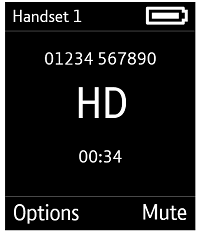
- Check that the call you're making is in HD
If it is, you'll see the HD logo on your handset screen when in a call. HD calling only works if the person you're calling also has an HD-compatible handset. If you're used to HD calls and are talking to someone still on the old PSTN system, the call may sound poor compared to what you're used to.
- Try another handset
Try another Digital Voice handset, if you have one registered, to see whether it's the handset or the line causing the problem. Or you could try plugging a phone into the phone port on the back of the Hub.
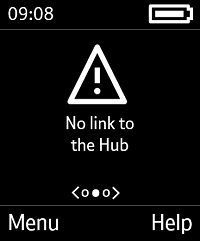
- Make sure you're in range of your Hub
If you're out of range, you'll see this message on your handset. The handset will continue to search for a connection every 60 seconds. You'll see a screen indicating it's searching for the Hub as it does so.
- Check that your handset is charged
If your battery is low, your call may disconnect when the power runs out. Try charging your handset and making the call again. We recommend charging your phone for up to 16 hours when you first set it up.
Make sure your phone is plugged into the phone port on the back of the Smart Hub.
Fix your Digital Voice service with our troubleshooter
You can test your connection, report a network fault, and fix a wide range of Digital Voice problems using our troubleshooting tool.
If we can't find a fault or fix the problem online, we'll give you the option to book an appointment with an engineer.
If you can't connect to your BT Broadband, you can also do all of this using your mobile internet connection.
Already reported a fault?
Track your fault and update contact details and appointment times using our fault-tracking service.
Still having problems?
Visit our contact pages for other ways to get in touch.