This article is for customers who want to set up the Digital Voice Adapter they’ve received as part of the move to the Digital Voice service.
About the Digital Voice Adapter
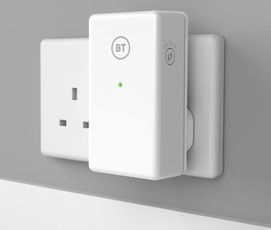
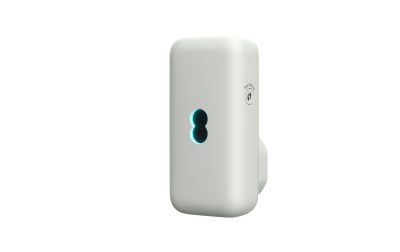
*Digital Voice Adapter model may vary
When your home phone service moves to Digital Voice, you may want to keep using your current home phones. If your phone is near your Smart Hub, you can plug it into the green port on the back of the hub.
However, if you want your phone to be in a different room to your hub, you can use a Digital Voice Adapter to place it wherever you want in your home.
Any tone-dialling phone can be used with Digital Voice, whether connected to your Smart Hub or a Digital Voice Adapter.
(Please note that older bell-wire telephones are not compatible with BT Digital Voice Adapter. You can request an EE Digital Voice Adapter which is compatible, from the order section below.)
Ordering a Digital Voice Adapter
The EE Digital Voice Adapter is compatible with both BT and EE Smart Hubs. It gives you the freedom to keep using your existing handsets on your Digital Voice service.
You can order a free EE Digital Voice Adapter online or text the word ADAPTER to 61998.
If you have any issues, just give us a call.
Product information for the Digital Voice Adapter
EE Digital Voice Adapter - userguide
BT Digital Voice Adapter - userguide
Set up your Digital Voice Adapter
Linking the Digital Voice Adapter with Your Hub
- Make sure your BT Hub is set up and powered on: The steady blue light indicates it's ready.
- Plug in the adapter: Connect your Digital Voice Adapter to a power socket near your hub.
- Press the WPS Button on your hub: Locate the WPS button on your hub (halfway up, on the left-hand side) and press it.
- Register the adapter: Within 1 minute, press and hold the WPS button on your Digital Voice Adapter for 6 seconds. The light on the Adapter will flash quickly during registration and turn solid green/aqua once complete.
Connecting a Home Phone
- Plug in the telephone line cord: Insert your home phone's existing telephone line cord into the socket on the top of the Digital Voice Adapter.
- Check for dial tone: Your phone should now have the same dial tone as when it was plugged into your old wall socket.
Using your Digital Voice Adapter
You can use up to a combination of 5 adapters and Digital Voice handsets to have a phone where you want it.
Deregistering a Digital Voice Adapter
Deregister an adapter from your hub
If you need to remove or deregister your adapter from your hub and don’t have any Digital Voice Handsets registered, you can do this from Smart Hub Manager.
You can access it from any device connected to your hub. Open a web browser and browse to 192.168.1.254. Tap return, and this will open Smart Hub Manager, then:
- Select the Phone tab
- Scroll to the adapter you want to deregister
- Select Deregister and follow the instructions
Deregister an adapter from your hub
From your handset’s menu:
- go to Settings and press Select
- scroll down to Registration and press Select
- scroll down to Deregister and press Select
- scroll to the adapter you want to deregister, and press Select
Important Safety and Care Instructions
- Use the adapter indoors only.
- Keep it away from heat, direct sunlight, and flammable materials.
- Ensure vents remain uncovered and the area is well ventilated.
- Keep the adapter and cables out of reach of children.
- Do not use it near water or in damp areas.
- Stop using it if damaged and contact the helpdesk.
- Do not open the adapter. There are no user-serviceable parts inside.
- Keep at least 20cm between the adapter and your body.
- If you have a pacemaker, consult a medical professional before use.
- Radio signals may interfere with some hearing aids.
Emergency Calls
You can't make emergency calls (999 or other numbers) from phones connected to your hub or Digital Voice Adapter during a power cut or broadband issue.
Make sure you have an alternative way to call for help in emergencies, like a mobile phone.
For more information, see Digital Voice: Will my service work in a power cut?
Disposal and Recycling:
Dispose of your old equipment responsibly. You can send it back to BT for recycling or use local recycling centers and retailer take-back schemes.
For more information, visit bt.com/weee.
Guarantee
1-Year Guarantee:
- Your Digital Voice Adapter is guaranteed for 1 year from the date of purchase.
- BT will repair or replace the product if it's not working properly.
- The guarantee covers issues found within the 1 year period and requires proof of purchase.
- It does not cover damage from accidents, misuse, or unauthorized repairs.
How to get in touch
Product information
- If your product is within warranty, contact the helpdesk on 0330 123 4150 (Monday to Friday 8am to 9pm; Saturday to Sunday 8am to 8pm).
- Replacement parts, including batteries, line cords and additional handsets, are available from BT's recommended supplier, GreenBox, at www.greenboxshop.co.uk.
- For anything else, get in touch.