
Problems with your BT Broadband connection? We can help.
-

Check the service status line
There may be a temporary problem at your local telephone exchange. Call the free service status line to check.

-

Check your equipment is connected correctly
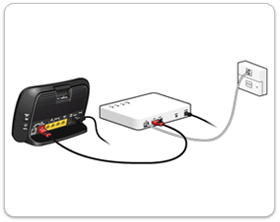
If none of the lights on your Home Hub or Openreach Modem are on, check that the power cables aren't loose, and double check they are plugged in properly and switched on at the mains
Now check there is a cable going from your main telephone socket to the 'DSL' port on your Openreach Modem.
Then, check there is a cable going from the 'LAN 1' port on your Openreach Modem, to the red 'Broadband' port on the back of your Home Hub.
-

Restart your equipment
First, restart your Openreach Modem by pressing and holding the 'Reset' button on the back of the Modem for 5 seconds. Wait a few minutes for the Modem to reconnect to the internet. When ready, the 'DSL' and 'LAN1' lights will be green. They may flash occasionally, this is normal.
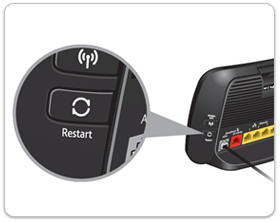
Next, press and hold the 'Restart' button on the side of your Home Hub until the 'Power' light goes orange. Wait a few minutes for the Home Hub to reconnect to the Openreach Modem. when ready, the 'Broadband' light should be blue.
-
Still not working
There are a few more tests you can try to check if there is a problem with your equipment or with the telephone wring in your home. If you have a smartphone, go back to our broadband connection guide on www.bt.com/help from your phone, and we will guide you through the steps you need to take.